Monday, November 22, 2010

Hulu Plus

Get you first 2 weeks of Hulu Plus for free just sign up here

Read more...

Sunday, October 3, 2010

Ringtones

here are some ringtones that i have made for nextel/boost fones http://www.mediafire.com/?nqv8kg661y0tn19

Read more...

Monday, June 7, 2010

i1 for sale on June 20th

Thats right the i1 will be up for sale at Best Buy on June 20th.. And may have a 349.99 price tag on it.

Read more...

Thursday, May 27, 2010

More i1 print ad

Read more...

Wednesday, May 26, 2010

How To: Load (Almost) Any Game or App On Boost and Nextel

With over 57,000 freely distributed Java applications available, I'll never be able to download, test, package, write up and post all of them.
You don't have to wait for me to post your favorite  game or app.  This tutorial shows you how to load Java applications on Boost iDEN and Nextel phones using Sprint/Nextel's ADP iDEN Content Uploader, which is a web based developer tool. This method does not require a data cable but it only works with phones on Boost Mobile or Nextel USA and requires access to a PC.
These instructions are based on using Windows XP because that's what I have. As far as I know, everything should work the same on Vista or Windows 7.  Users of other operating systems will have to find alternative programs for creating .JAD and .ZIP files but otherwise the process should be the same.
    JADMaker
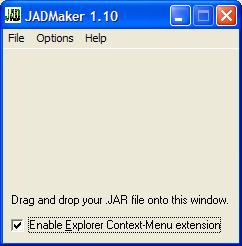
  • A Java game or app consists of two files; .JAR and .JAD. The JAR (Java ARchive) is the actual executable file.  The JAD (Java Application Descriptor) is a text file describing the JAR's characteristics.  iDEN phones require both files in order to install. Some sites, including Getjar, only provide the .JAR, but the .JAD is easy to create using a program called JADMaker.
  • If you already have both the .JAR and .JAD files skip to the next step. If you only have the .JAR file - download JADMaker.zip. Unzip the contents into a folder and then run JADMaker.exe by double-clicking it in Windows Explorer.  Still in Windows Explorer, navigate to the folder with the .JAR file and drag it into JADMaker, which will to create the .JAD in the same directory as the .JAR.
Creating
 a ZIP file with Windows
  • Create a .zip file containing the .jar and .jad.  There are many programs that can create  .ZIP files. I get good results using the ZIP file utility that is built into Windows XP, Vista  and 7. To use it highlight both files by holding Ctrl and clicking them.  Then right-click the selected files and choose Send to and then Compressed (zipped) folder (image above). If you get a dialog box asking you to "Designate Compressed (zipped) folders as the application for handling ZIP files?", click "Yes"
iDEN 
Content Uploader
  • Open the ADP iDEN Content Uploader at  http://144.230.114.35/adp1/FUN/index.jsp (image above).
  • Enter your Boost or Nextel mobile phone number in the field labeled PTN:
  • Click the Browse button and navigate to the folder where you created your ZIP file.
  • Click the ZIP file and then click "Open"
  • Click the Upload button
  • The rest of the process is the same as if you sent the app to your phone from BoostApps;
  • Press the phone's Menu button.

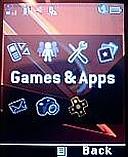
Main Menu - Games 
& Apps Highlighted In the menu, highlight Games & Apps (called Java Apps on some phones) and press OK.
Games & Apps
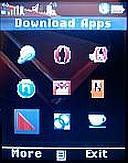
 Menu - Download Apps Highlighted
In the Games & Apps Menu, highlight Download Apps and press OK.
Download Apps 
Menu - New Purchases Highlighted
In the Download Apps Menu, select New Purchases and press OK.
  • Scroll down and select your new game or app, they are listed in alphabetical order.  Press OK and on the next screen click the left soft key labeled "Get It" and the download will start.
  • When the download finishes, close Download Apps and your will be prompted to install the new game or application.
  • If the installation was successful you will see the new game or app in you Java menu.  Try running it.
Sounds easy, right?. Well it is except that it doesn't work over half the time.  Lots of things can go wrong.  Here are some of the problems and what you can do about them.
  • When you go to new purchases, your new game or app isn't there. The most likely cause is that you entered your phone number incorrectly.  Try again and remember to enter the number with no dashes or spaces, just ten numbers starting with the area code.  Do not put a "1" in front of the number.  There also seem to be a small number of phones that both  BoostApps and the ADP iDEN Content Uploader just don't work with. Its probably a provisioning error by Boost, but as neither BoostApps or the Content Uploader are supported by Boost calling customer support is unlikely to help. I'm sorry but I don't have a solution if this happens to you.
  • "Failed Download with status code:904 (Attribute Mismatch) Please Retry"  at the start of the download - This is very common.  It seems to be a bug in the Content Uploader.  The solution is simple.  Rename the zip file and upload it again. It doesn't really seem to matter what you rename it to. I usually just add or remove a letter from the file name.  In a few cases I've had to rename the file a couple of times before it would work.
  • "JAR file mismatch" while installing - this is an error in the JAD file.  It should never happen if you use JadMaker but seems fairly common with downloaded JADs.  To fix it, delete the JAD and ZIP and use JadMaker to create a new JAD.  Then make a new ZIP and upload again.
  • "Java Error" while installing.  When this happens, find the new app in the Java Apps menu.  It will have a generic looking icon with an X or downward pointing arrow on it.  Select the app and press "OK".  It will start installing again only this time it will list the steps of the install on the screen. Wait for it to fail and then take note of which which step it failed on:
If the error occurs during the "Loading Classes" or "Validating classes" part of the install it means that the app is not compatible with your phone and will never work. I find that only about half of the generic Java apps that I try actually work on iDEN phones.
If the error occurs during the "Allocating Flash" or "Writing Flash" install phase, it means you don't have enough free space on the phone. Delete one or more other apps or games and restart the install on the phone. To delete an app, select it in the menu, press the "Menu" key and choose "Deinstall".
Good luck finding and installing games and apps.  Let us know in the comments of your successes and failures. If you find a particularly good, freely distributable game or app let me know so I can add it to BoostApps.

 via: boostapps

Read more...

Monday, May 24, 2010

i1 print ad

Proof that the i1 will be on Boost


Via: Mobile Crunch

Read more...

Pics of the Boost Mobile Motorola i1

With Boost Mobile branding(Click pic of the back)

Read more...

Sunday, May 23, 2010

Moto i1 to be sold at Best Buy

Yep thats right sold at Best Buy. And plus for only $349.99. Also IT WILL BE ON BOOST. So peep this link out http://www.bestbuy.com/site/Motorola+-+i1+Mobile+Phone+-+Black/Silver+%28Boost+Mobile%29/9935936.p?id=1218198443380&skuId=9935936

Read more...

Wednesday, May 19, 2010

Motorola i1 now on sale for SouthernLinc

Yes that is right the i1 is for sale today. But it is for SouthernLinc So if you can get a hold of one post a review in the comments and if someone can unlock it for Nextel/Boost please share. BTW it sell for $399 with out service if, they will sell it with out service.

Read more...

Friday, May 14, 2010

Free 411 update

So I tryed the free 411 on boost today and I dont like it. The first thing is that they play a ad off the bat. Next is the voice recognition is shitty. Also if you can get it to understand you it play one more ad. Then when you say connect it rings once then takes you back to the menu. But it does read the number to you. Also you can have it txt the number to you but when it tryed it I never got the txt. So just use goog411(1-800-GOOG-411) sure you get ads sometime but not all the time. And the voice recognition is top notch. The only plus for Boost 411 is that you can look up residential numbers. I hope this helps someone......keep on boosting.

Read more...

Thursday, May 13, 2010

i1 Owner's Manual

It is for SouthernLINC but it will work Owner's Manual via SouthernLINC

Read more...

Tuesday, May 11, 2010

New links

I have add some new links on my link bar(LOOK UP^^^). I have add Motorola iDEN - Product Support for all your updating needs so you can get the newest firmware for your Nextel/Boost handsets. MOTODEV so you can get the inside story on anything Motorola and iDen. And I also add BoostApps for all your Nextel/Boost apps think of it as a free and unofficial app store for Nextel/Boost.

Read more...

Free IM+EMAIL update

Ok all Boosters I have installed IM+EMAIL on my i456. It works great. I really like that I can check my POP3 emails also. So if you have not downloaded it yet...........do it. It works and it is free. I have not tryed the free 411 on it yet cuz i use goog411 but, I will try it and give a update on it. So keep on chirpin'

Read more...

Wednesday, May 5, 2010

Free IM+EMAIL and 411 on boost

ok today boost made 411 im and email(pop3) free goto Go to http://boostmobile.com, click "Shop" > "Ringtones and more" > "Add Applications" > "Chat, Flirt & Fun" to DL

Read more...

Thursday, March 4, 2010

i465 software update

Ok I just looked on the Moto iDen support page HERE and the i465 has a firmware update for it. It will update your fone to RA4.00.02. You must have a data cable for the update. SO go here for Boost/Nextel/Sprint. Run the installer and follow wut it tells you.

Read more...

Monday, January 25, 2010

BoostApps

http://boostapps.com/
check it out for free apps for your iDEN Nextell/Boost

Read more...

Saturday, January 9, 2010

Opus One is now the i1.

Yep that's right the Opus One will now be know as the Motorola i1. So keep your eyes open for it soon.

Read more...

Tuesday, January 5, 2010

Motorola Opus One

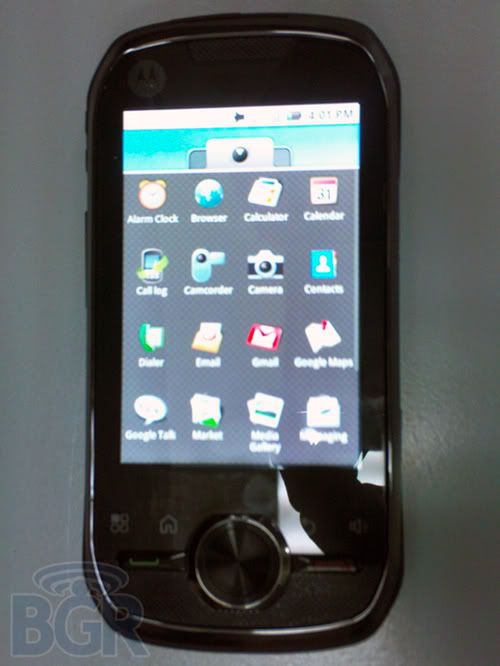
The Motorola Opus One is the first iDEN headset to offer Google's Android OS. It also has a touchscreen. This fone will come to Nextel/Boost.


Specs:

* 3.1″ hVGA 320×480 capacitative touchscreen display
* 3 megapixel autofocus camera with LED flash
* Accelerometer
* Proximity sensor
* Wi-Fi 802.11b/g
* Bluetooth
* microSD card slot
* 2.5mm headset jack
* Home, Menu, Back, Speaker buttons are capacitive buttons with haptic feedback
* iDEN PTT & PTX
* Android LBS which is integrated into the iDEN GPS engine
* “Enterprise email”
* Plastic-molded housing with some rubberized texture finishes
* 58mm in width, 118mm in length
* 100g weight
* 512MB Flash / 256MB of RAM
* 64k and 128k iDEN SIM card support
* A-GPS
* Motorola dual-mic technology noise-canceling for noisy enviroments
* Flash Lite v3.1.x
* Some of the preloaded apps include: corporate email client with ActiveSync support, MOTONAV navigation app, barcode scanner, and document viewer.


Here are some videos of the fone.

1.)


2.)


3.)

4.)


Pix from: BGR
Videos from: PR UK

Read more...